
"A twenty-five dollar USB stick and a coat hanger wire can receive photographs from space.
"KaiRenner26th of April 2026
What NOAA APT Satellites Transmit
NOAA 15, 18, and 19 are polar-orbiting weather satellites that continuously broadcast images on 137 MHz in a format called APT (Automatic Picture Transmission). The signal is analog FM and can be received with a simple omnidirectional antenna. Each satellite passes overhead 2 to 4 times per day at a peak elevation visible for about 10 minutes. Free software decodes the audio recording into a visible weather image.
137.1/ 137.9 MHz
10to 15 Minutes
Set Up the RTL-SDR and Drivers
Install RTL-SDR drivers and verify the dongle works with SDR#.
Set Up the RTL-SDR and Drivers
Purchase an RTL-SDR Blog V4 dongle — better shielding than cheaper clones. Install Zadig driver on Windows: run Zadig, select the RTL-SDR device, install WinUSB driver. Open SDR# (sdrsharp.com) and tune to an FM radio station to verify reception. You should hear clear audio. Linux: rtl-sdr driver installs via apt.
Build or Connect a V-Dipole Antenna
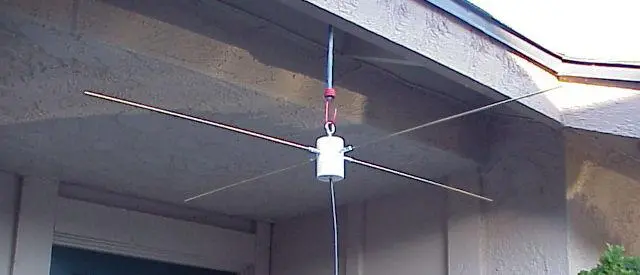
Two elements each 53.5cm long at 120 degrees apart — tuned for 137 MHz.
Build or Connect a V-Dipole Antenna
A V-dipole antenna tuned to 137 MHz requires two elements each 53.5cm long. Angle them at 120 degrees from each other (not 180 degrees). Connect to coax with one element to center and one to shield. Mount pointing upward, horizontally polarized. The RTL-SDR Blog dipole kit ($10) includes adjustable elements and is the easiest solution.
Find Pass Times and Record the Signal
Use Heavens-Above or Orbitron to predict passes and record with SDR#.
Find Pass Times and Record the Signal
Use Heavens-Above.com (enter your location) or Orbitron to predict NOAA satellite passes. Look for passes above 30° maximum elevation — low passes produce weak signals. Set SDR# to the satellite frequency (NFM mode, ~40kHz bandwidth) 1 to 2 minutes before the pass. Record the audio pass using Audacity or SDR#'s built-in recorder as a WAV file at 44100 Hz.
Decode the Recorded Audio Into an Image
Open the WAV file in NOAA APT decoder software to extract the image.
Decode the Recorded Audio Into an Image
Open your recorded WAV file in WXtoImg (historical but still widely used) or the open-source noaa-apt software. The software decodes the audio modulation into two side-by-side infrared images showing cloud cover, land surface temperature, and geographic features. The image quality correlates directly with antenna placement and maximum elevation of the pass.
What You Need
RTL-SDR Blog V4 USB dongle
V-dipole antenna kit or DIY from wire
SDR# or SDR++ software (Windows) or GQRX (Linux/Mac)
noaa-apt or WXtoImg decoding software
Heavens-Above.com account for pass prediction
Doppler Shift Degrades Long Passes As the satellite approaches, its frequency appears slightly higher than nominal, then shifts lower as it moves away. WXtoImg handles Doppler correction automatically if you configure your location. noaa-apt also has Doppler correction. Manual recordings at a fixed frequency will show a slight audio pitch variation — this is normal and does not prevent decoding.
"An image of cloud cover over your continent, received by hardware you assembled yourself. That is not a simulation.
"KaiRenner26th of April 2026